Lorky`s Blog - Techno ressources and general informations for everyone !
Note
All blog links are archived here.
GPP for printers and print driver / Mapping problem
October 6, 2021, 9:27 am
Hi everyone
Following KB5005652 from Microsoft that fix some security flaw (CVE-2021-34481) it's now reported that some GPP can have difficulty to map the printer.
If it cause problem a registry key can be changed to allow the mapping and driver installation.
Keep in mind that registry key don't need a restart, so it can be enable and disabled easilly in your GPO sequence.
The registry is: RestrictDriverInstallationToAdministrators
The location is: HKEY_LOCAL_MACHINE\Software\Policies\Microsoft\Windows NT\Printers\PointAndPrint
You need to set it to 0 (DWORD)
It can be scripped that way too;
reg add "HKEY_LOCAL_MACHINE\Software\Policies\Microsoft\Windows NT\Printers\PointAndPrint" /v RestrictDriverInstallationToAdministrators /t REG_DWORD /d 1 /f
You can put it back on 1 after your last GPP has applied.
Thanks
Windows 11 Release
October 6, 2021, 9:09 am
Hi everyone !
For a follow-up on another blog post I did, where an Windows 11 ISO was available, but still in preview, now it's available for real.
 To get it please go to this link. (https://www.microsoft.com/en-us/software-download/windows11)
Happy upgrading :)
Modern Authentication for office on older OS (Windows 2008R2 or 7)
September 8, 2021, 3:45 pm
Hi
Today I seen some report, and I tested with some older OS, and the modern authentication now seem broke.
I wanted to discuss it, as not much site talk about the issue.
In my test any Office supported for O365 is impacted, so it really target the underlying OS.
The issue is an blank Windows appear, and it never load the content to authenticate.
I join an printscreen of the error;
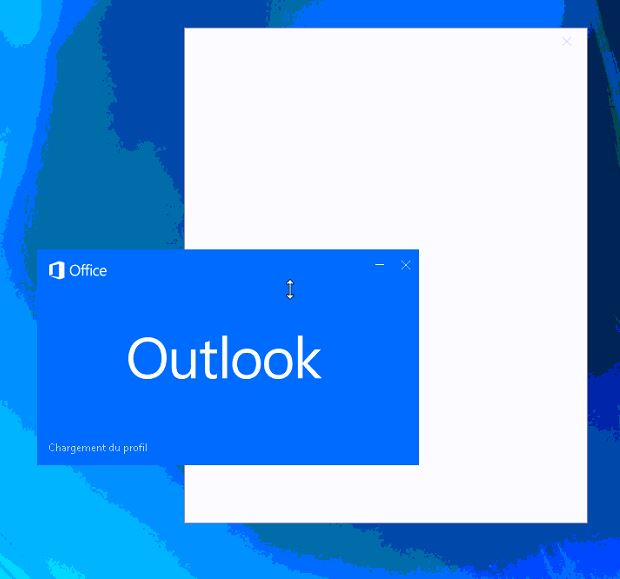
Some older post from last year talk about ADAL registry key, but touching it just remove the blank windows, so it's of no use.

In my case I migrated those system to a newer OS and now it work good, but I just wanted to share the bug if you fall into it.
Thanks
Windows 11 ISO now available !
August 19, 2021, 1:31 pm
Hi everyone
A good new, Microsoft now released the first set of ISO for Windows 11 (build 22000.132)
Please see there for the link; Announcing Windows 11 Insider Preview Build 22000.132
To quote the article, the new changed added is;
Chat from Microsoft Teams is now available for Windows Insiders in the Beta Channel. We’re also excited to begin rolling out one-to-one and group audio and video calling, with many of the features that you’ve come to expect. You can create and join meetings. You can toggle your microphone and camera on or off and choose your preferred speakers, mic, and camera with device settings. You can manage meeting information and options. You can share your screen, see the roster of participants, admit meeting participants from the lobby, chat and see people’s video in a gallery view. We’re excited to bring this experience to a growing network of people!
The new Snipping Tool for Windows 11, updated Calculator app, and updated Mail and Calendar apps are rolling out to Windows Insiders in the Dev Channel – see this blog post here for details!
Thanks
Windows 10 IoT - DISM for updating Windows Update
May 17, 2021, 10:35 am
Hi everyone
Today I wanted to discuss small tips for making Windows Update via DISM.
The goal is that often on IoT terminal the Windows Update services is off and often not configured correctly, as the goal of IoT is often to create never changing terminal for a specific's task. This kind of setup bring some headache sometime as to update it mean sometime when we put back on the Windows Update's service, misconfiguration can happen.
The other goal is that often the image file is used to deploy such terminal, as such applying a patch offline to them help for future deployment.
Today I will talk the second's goal.
DISM is a powerfull tool, but it's to know it's force that is a challenge.
To update a offline image the first step is to get the DISM that is shipped in the Windows Assessment and Deployment Kit (Windows ADK) (https://docs.microsoft.com/en-us/windows-hardware/get-started/adk-install)
After installing it we need to mount our WIM's file with the /mount-wim command's line.
dism /mount-wim /wimfile:"c:\en_windows_10_enterprise_2016_ltsb_x64_dvd_9059483\sources\install.wim" /mountdir:"c:\win10" /index:1
After we add the package with /add-package
dism /image:"c:\win10" /add-package /packagepath:"c:\patch\windows10.0-kb4576750-x64_c4e0b5e0f0835db971a40058aa17ae9a0d2f1e2a.msu"
After we need to commit the file back with /commit
dism.exe /Unmount-wim /mountdir:"c:\win10" /commit
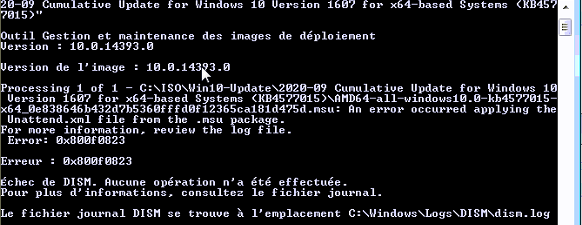
For reference if you see a DISM error #0x800f0823 it can mean you are using the wrong DISM, not the one provided with the ADK's toolkit.
The error look like that;
That conclude today talk,
Thanks everyone !