Lorky`s Blog - Techno ressources and general informations for everyone !
Note
All blog links are archived here.
Windows Update Error 80072F8F
November 8, 2022, 11:57 am
Hi everyone
Today I wanted to talk about a error that can happen in Windows Update.
It's the error 0x80072F8F.
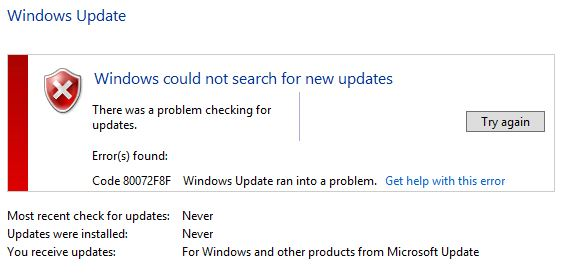
That error is pointing to an error of the update client. There is two possible causes;
First: The update client is outdated, due possibly to a lack of update done over time. This tend to happen more on older OS like in Windows Server 2012 in example.
To resolve such case you can download a updated client from Microsoft;
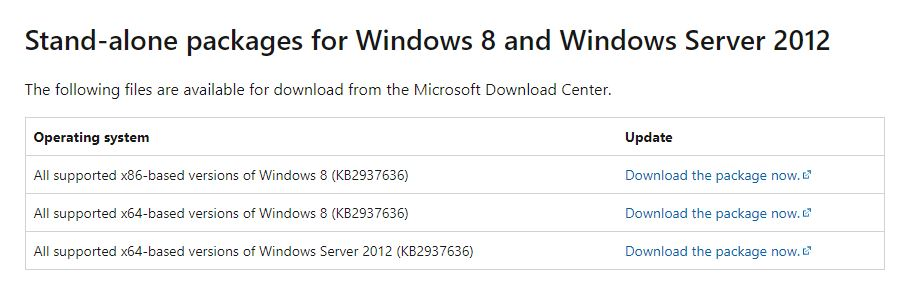
Update to Microsoft Update client (https://support.microsoft.com/en-us/topic/update-to-microsoft-update-client-80891e31-29ed-510d-819b-a4c4ee4aa1b7)
After the update just re-run Windows Update to have it work.
Second: An error in the time set inside the computer with a huge offset will cause the update client to fail to get any information. Make sure the computer time is correct.
Wait for printer(s) Mapping on RemoteApp publication
November 2, 2022, 10:28 am
Hi ! Today I wanted to share a small tip if you need to wait for the printer mapping to map before openning a RemoteApp.
This tip is handy in case where the application doesn't refresh it's internal list of printer when it start.
Microsoft Office suite is done perfect for that matter, as you can open it, as the list of printer just update when it's ready to be used.
Some older applications (even newer) are done in more primitive's way need the printer to be there when it start.
Sage 50 is a good example, and there is some in like FoxPro language, so the tip is still valid today.
The tip is to publish a command file, .cmd or .bat that launch the application, but inside the script you can enter that before launching the app;
@echo off
ping -n 3 127.0.0.1>null
That example will add a 3 second delay before openning the application.
Account lockout available for built-in local administrators
October 31, 2022, 3:47 pm
Hi
Today I wanted to share a nice new change Microsoft introduced in the 11 October 2022 cumulative update.
Account lockout are available for built-in local administrators for any network service (RDP, etc..) but not for Console access.
If you want to see where it's;
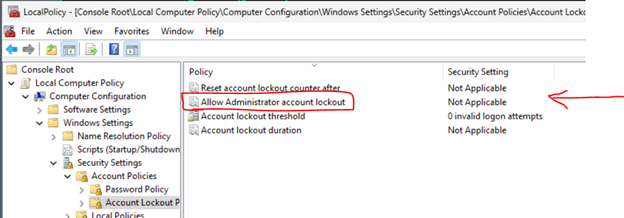
It's a nice way to be able to block password bruteforce tip.
The location is Local Computer Policy\Computer Configuration\Windows Settings\Security Settings\Account Policies\Account Lockout Policies
To note if you use a Windows build 22H2 with the newer update to deploy computer the option will be Enabled by default, and Microsoft will enable the use of complex password at the same time. You can unset the later setting, but it can be a security risk. (Local Computer Policy\Computer Configuration\Windows Settings\Security Settings\Account Policies\Password Policy)
You can read more on the topic are; KB5020282
PacRequestorEnforcement Enforcement date
October 21, 2022, 3:36 pm
Hi everyone
I wanted to share that soon enformement of the PAC inside a KRB ticket will be active. (22 October 2022)
If in your enviromment you still see such error;
The KDC encounters a TGT or other evidence ticket without a PAC. This prevents the KDC from enforcing security checks on the ticket.
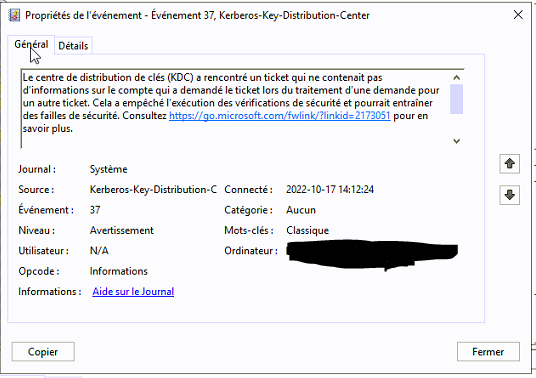
That can have an impact if you have older domain controler, like a 2008R2 without the extended support option, as such the fix is not available for them.
A registry key exist, but after the 22 October 2022 it will no longer be checked;
To quote the registry key information;
| Registry subkey | HKEY_LOCAL_MACHINE\System\CurrentControlSet\Services\Kdc |
| Value | PacRequestorEnforcement |
| Data type | REG_DWORD |
| Data | 1: Add the new PAC to users who authenticated using an Active Directory domain controller that has the November 9, 2021 or later updates installed. When authenticating, if the user has the new PAC, the PAC is validated. If the user does not have the new PAC, no further action is taken. Active Directory domain controllers in this mode are in the Deployment phase.2: Add the new PAC to users who authenticated using an Active Directory domain controller that has the November 9, 2021 or later updates installed. When authenticating, if the user has the new PAC, the PAC is validated. If the user does not have the new PAC, the authentication is denied. Active Directory domain controllers in this mode are in the Enforcement phase.0: Disables the registry key. Not recommended. Active Directory domain controllers in this mode are in the Disabled phase. This value will not exist after the July 12, 2022 or later updates.Important Setting 0 is not compatible with setting 2. Intermittent failures might occur if both settings are used within a forest. If setting 0 is used, we recommend that you transition setting 0 (Disable) to setting 1 (Deployment) for at least a week before moving to setting 2 (Enforcement mode). |
| Default | 1 (when registry key is not set) |
| Is a restart required? | No |
Removing Team from autostarting GPO
October 21, 2022, 3:22 pm
Today I wanted to share a small tip if you need to remove Team from autostarting when the session start for your users.
The easiest way if you have installed it to your user without the autostart at off is to remove by GPO the run command.
The path is;
HKEY_CURRENT_USER\Software\Microsoft\Windows\CurrentVersion\Run
com.squirrel.Teams.Teams
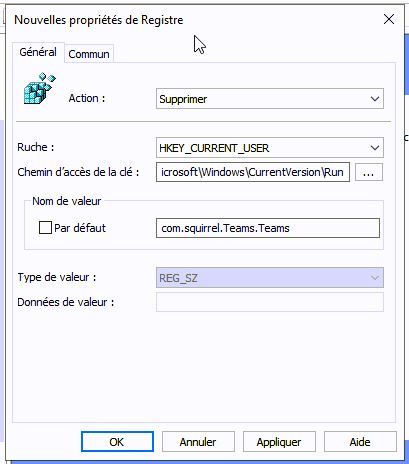
At the next logon your user will not see the Teams application loading, which can help on load time :)