Lorky`s Blog - Techno ressources and general informations for everyone !
Note
All blog links are archived here.
Symantec new technote ! V-225-302 for BackupExec 2014
January 28, 2015, 8:58 pmHi everyone! Today I found a new bug and the page at symantec does not exist yet.
I decided to create it for them, as it can be a error other will see. It happened on Windows Server 2012 R2 in case it has an importance.
Note: The log show the link http://entsupport.symantec.com/umi/V-225-302. At this time this error is not classified.
Symptom: You install BE2014 on a new system and the installation fail with the error code V-225-302
Error: V-225-302: ERROR: Failed to install SQL Express BKUPEXEC instance with error -2067922940.
Corrective Step: Pre-install the SQLExpress with the /SKIPRULES=PerfMonCounterNotCorruptedCheck parameter.
- Locate the SQL install string in the error log; it would look like that (see there for the location);
"G:\BE\WINNT\INSTALL\SQLExpress\SQLEXPR_x86_ENU.exe" /ACTION=Install /Q /Hideconsole /SkipRules=RebootRequiredCheck /FEATURES=SQL /INSTANCENAME=BKUPEXEC /SQLSVCACCOUNT="AUTORITE NT\Système" /SQLSVCStartupType=Automatic /ENABLERANU=0 /TCPENABLED="1" /NPENABLED="0" /INSTANCEDIR="C:\Program Files\Microsoft SQL Server" /SQLSYSADMINACCOUNTS="BUILTIN\ADMINISTRATORS" /IACCEPTSQLSERVERLICENSETERM
- In my case change the account information, /SQLSVCACCOUNT="AUTORITE NT\Système" for /SQLSVCACCOUNT="NT AUTHORITY\System". A setup error for localisation.
- Add the new command line and launch the full command. From run
"G:\BE\WINNT\INSTALL\SQLExpress\SQLEXPR_x86_ENU.exe" /ACTION=Install /Q /Hideconsole /SkipRules=RebootRequiredCheck /FEATURES=SQL /INSTANCENAME=BKUPEXEC /SQLSVCACCOUNT="NT AUTHORITY\System" /SQLSVCStartupType=Automatic /ENABLERANU=0 /TCPENABLED="1" /NPENABLED="0" /INSTANCEDIR="C:\Program Files\Microsoft SQL Server" /SQLSYSADMINACCOUNTS="BUILTIN\ADMINISTRATORS" /IACCEPTSQLSERVERLICENSETERMS /SKIPRULES=PerfMonCounterNotCorruptedCheck
- Run and wait, as it will run silent.
- Re-run the BE setup after.
Windows Server: Remote Desktop Error: The task you are trying to do cant be completed because Remote Desktop Services is currently busy
November 29, 2014, 3:36 amHi everyone
Today I will talk about a tip to kill / reset any RDP session when it's locked out and that give the error "The task you are trying to do can't be completed because Remote Desktop Services is currently busy"
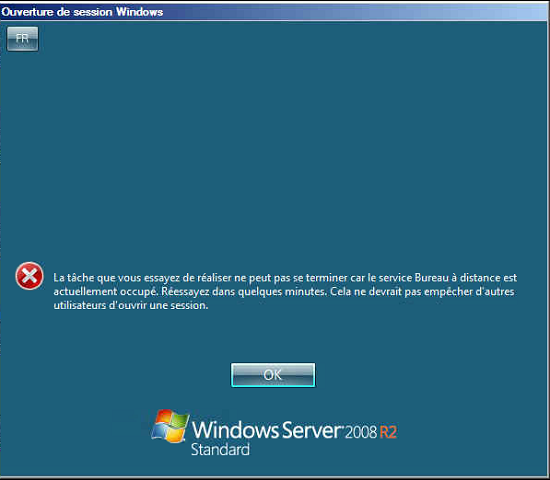
You will see some printscreen with the ica-rdp's description, but I'am using the Windows Server built-in tool to reset the session, and the RDP's session manager was in error too for that session. (ica is built over rdp)\
From that MMC you see an active session, but no application run.
When that happen you will have those symptoms:
- In taskmgr you will see no application under the useraccount in error
- In the RDP's MMC you will not see the user logged, even if you see everyone else logged.
- The user profile is lock. (IE, you can't delete it)
- The winlogon process seem to never finish for that session

From the MMC you can't kill the session or reset it as it does not offer the choice to do it.
The first thing to do is a query session in command shell to validate. There we can see the real status, it's still in Connecting.
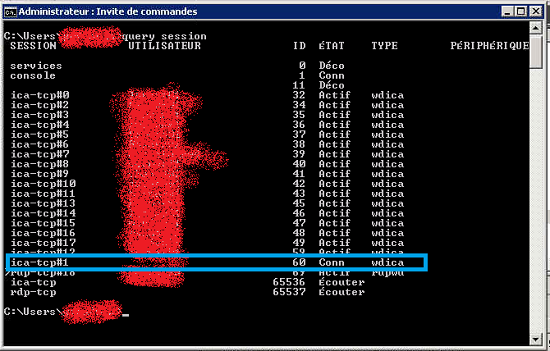
After you can issue a reset session \<session-name>.
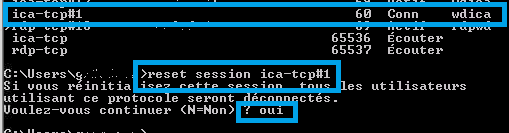
Now relax and enjoy, you just saved yourselft a server restart for a hung connection :)
In my case the culprit was a bad GPO for that user.
Books
November 25, 2014, 9:11 pmThe Wiki Ninjas Guide to SharePoint 2013 - IDTP
I’m proud to present you the second Wiki Ninjas Guide to SharePoint 2013. This eBook is not mine. It's also not yours. But it’s from the community. You can find many articles here written by Philippe Levesque, Benoit Jester, Valentin Lecerf, Hezequias Vascelamos and Gokan Ozcifci!
This eBook is intended for people all around the world with the following questions: “Why should I come and contribute to the WIKI” or “Oh what kind of articles can I find on the WIKI”… In stand of selected articles on the WIKI I guess we can create a hug impact with a real eBook. Authors, guest authors and many contributors, you all can be proud about the amount of articles and your will to improve the Wiki!
Specials thanks to:
- Ed Price
- Bruno Lewin
- Philippe Levesque
- Benoit Jester
- Valentin Lecerf
- Hezequias Vascelamos
- ...
You all can download and/or share this eBook and begin evangelize the WIKI!
Happy SharePointing!
Windows Server: Code 19: Windows cannot start this hardware device because its configuration information (in the registry) is incomplete or damaged
November 19, 2014, 7:54 pmHi everyone
If you happen to come accross this error it can have multiple cause.

Fact:
- Re-installing the driver does NOT fix the error.
- Erasing and to let the system to re-install does NOT fix the error.
Fix:
- Check in the registry under : HKLMSYSTEMCurrentControlSetControlClass and find the device that give you problem. In my case it was a Tape Driver, so I looked in each Class to find the description matching the error.

- In the correct device class erase the LowerFilters key

- Restart the server
Now it should work !
A reference (it show another code 19 error): http://technet.microsoft.com/en-us/library/cc772156(v=ws.10).aspx
Dell | Wyse Terminal badly support VLAN tagging and DHCP problem
March 3, 2014, 11:12 pmHi, today I will talk about a issue I found today.
The Wyse Xenith & CL0 serie brougth a lot of headache for the DHCP's request, as it seem to spam before the network port open. The STP kill the DHCP's attemp. So, the fix is quite easy, port-fast for each port.
Today I felt on a bigger problem. After some upgrade in my park, I found myselft with the re-surfacing DHCP's problem. I was there, why ???
I wireshark'ed the network traffic, and after some test I found that tagged VLAN's traffic is just not an option with those Wyse.
I was in the default VLAN's ID (1), and the port set as access or trunk or any other type just didn't work. I even see other DHCP offer, wich was really strange... (DHCP offer from the VLAN 50)
Thus, now I tested it with a old dummy switch, and no more problem ....
The moral of the story :
User HAPPY on DELL Client = port-fast + no VLAN