Lorky`s Blog - Techno ressources and general informations for everyone !
Note
All blog links are archived here.
Active Directory - Delegate to Disable Users
December 19, 2023, 10:39 am
Hi everyone
Today I wanted to talk a older topic, but still up to date, as I had to do it lately :)
If you want to delegate the control to an group / user to disable some Active Directory user you must delegate control to the user to read/write on the userAccountControl field.
That field is used there inside that windows (first pic took from there);
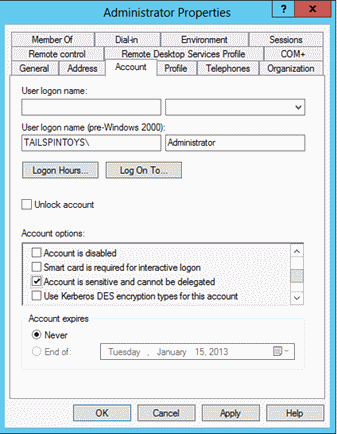
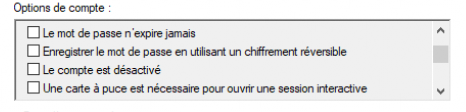
To be more exact, the filed control those options;
In the Active Directory User and Computer's applet you can click to delegate;
After you click to enable the delegation only for users account;
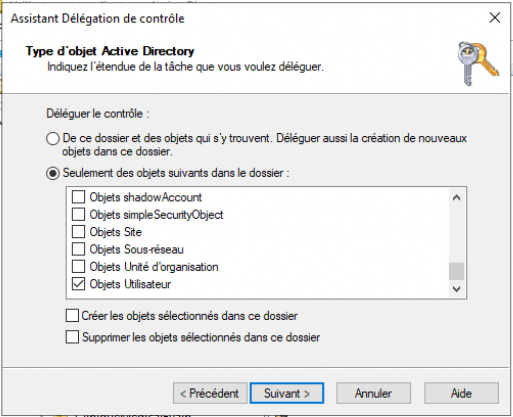
After we click on read/write userAccountControl;
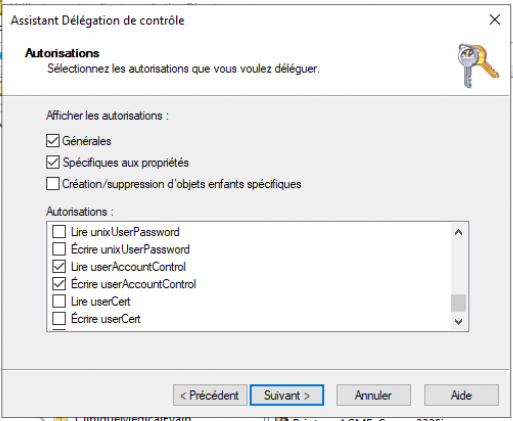
And that's all, it should work after :)
For reference the field hold these values; (reference)
| Property flag | Value in hexadecimal | Value in decimal |
|---|---|---|
| SCRIPT | 0x0001 | 1 |
| ACCOUNTDISABLE | 0x0002 | 2 |
| HOMEDIR_REQUIRED | 0x0008 | 8 |
| LOCKOUT | 0x0010 | 16 |
| PASSWD_NOTREQD | 0x0020 | 32 |
| PASSWD_CANT_CHANGE You can't assign this permission by directly modifying the UserAccountControl attribute. For information about how to set the permission programmatically, see the Property flag descriptions section. |
0x0040 | 64 |
| ENCRYPTED_TEXT_PWD_ALLOWED | 0x0080 | 128 |
| TEMP_DUPLICATE_ACCOUNT | 0x0100 | 256 |
| NORMAL_ACCOUNT | 0x0200 | 512 |
| INTERDOMAIN_TRUST_ACCOUNT | 0x0800 | 2048 |
| WORKSTATION_TRUST_ACCOUNT | 0x1000 | 4096 |
| SERVER_TRUST_ACCOUNT | 0x2000 | 8192 |
| DONT_EXPIRE_PASSWORD | 0x10000 | 65536 |
| MNS_LOGON_ACCOUNT | 0x20000 | 131072 |
| SMARTCARD_REQUIRED | 0x40000 | 262144 |
| TRUSTED_FOR_DELEGATION | 0x80000 | 524288 |
| NOT_DELEGATED | 0x100000 | 1048576 |
| USE_DES_KEY_ONLY | 0x200000 | 2097152 |
| DONT_REQ_PREAUTH | 0x400000 | 4194304 |
| PASSWORD_EXPIRED | 0x800000 | 8388608 |
| TRUSTED_TO_AUTH_FOR_DELEGATION | 0x1000000 | 16777216 |
| PARTIAL_SECRETS_ACCOUNT | 0x04000000 | 67108864 |
Migrate files server to the cloud - Hybrid GPO
December 11, 2023, 2:43 pm
Hi everyone
Today I wanted to two useful GPO if you migrate your file server to SharePoint online.
The GPO are to create automatically the OneDrive Sync to the document library, the some useful setting to push and a settings for the delay for applying the configuration.
The first GPO to apply is to create the Mount point for the selected user. I suggest to use the same security group as the mapped drive was.
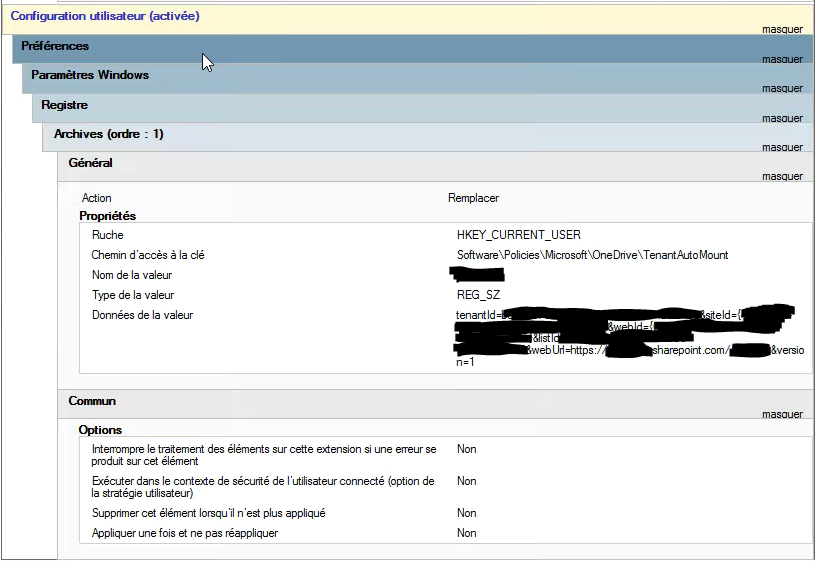
It's in HKEY_CURRENT_USER\Software\Policies\Microsoft\OneDrive\TenantAutoMount (REG_SZ)
Value Name = Text for the mount point to be created.
Value = Site URL
The site url can be obtained by navigating to the site, and click to Sync the site, it will offer an option to copy the link. The link must be un-escaped.
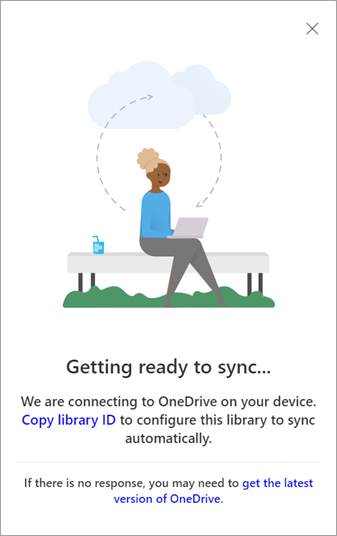
The link format is; tenantId=xxx&siteId=xxx&webId=xxx&listId=xxx&webUrl=httpsxxx&version=1
To un-escape use PowerShell, it's the easiest to do;
::UnescapeDataString("Copied String")
To that GPO can be added one more registry setting; its tagged as it will make the change appear more fast, but it's to test. On Reddit its a value that is tagged to be working for some, and not for other. On my side I seen a difference, maybe 10-20min and not near 8 hours, but it's maybe just the GPO time to apply.
HKCU\Software\Microsoft\OneDrive\Accounts\Business1
"TimerAutoMount"==dword:00000001
The last option I recommand is to make sure the File On Demand is activated, so that change in a computer GPO for that one;
HKLM\SOFTWARE\Policies\Microsoft\OneDrive
"FilesOnDemandEnabled"=dword:00000001
Microsoft 365 roadmap - MFA for admin portal in November 2023
October 26, 2023, 3:54 pm
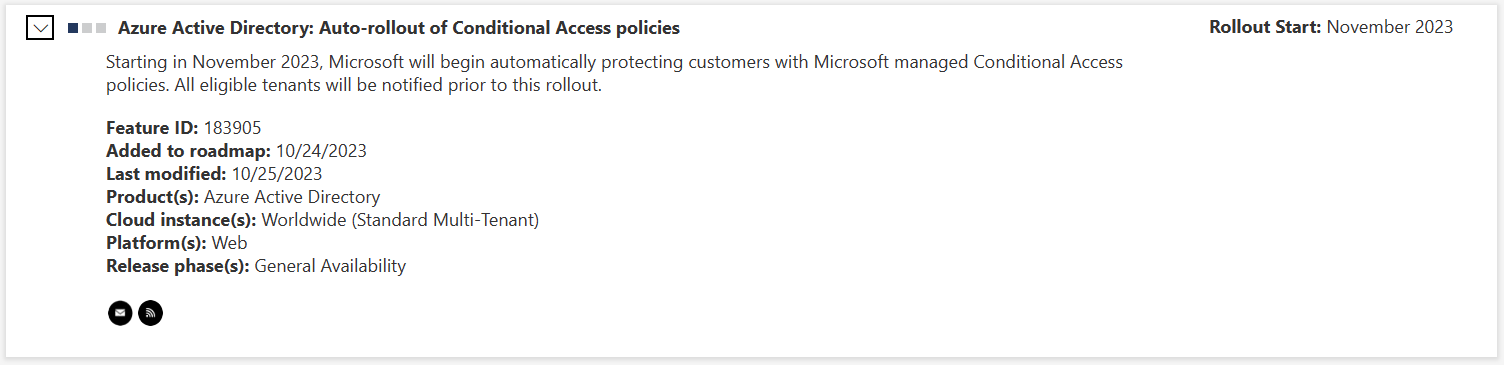
If you have Conditional Access rule inside your Entra tenant please make sure to see that roadmap;
Exchange Online New requirement for SMTP Relay
October 26, 2023, 3:37 pm
Hi everyone
I wanted to warn that on 1 November 2023 a new requirement will be there for SMTP relay inside Exchange Online.
Nov 1, 2023 – New Requirements for SMTP Relay through Exchange Online
Effective from November 1, 2023, the matching condition for the SMTP P2 sender domain will be removed. This means that relaying email through Exchange Online will require meeting the following criteria:
- Accepted domain: The SMTP certificate domain on the SMTP connection or the SMTP envelope sender domain in the MAIL FROM command (P1 sender domain) must be one of your organization’s accepted domains.
- Inbound Connector: The sending host’s IP address or certificate domain on the SMTP connection must match your organization’s Inbound Connector of on-premises type.
Failure to meet either of these conditions after November 1, 2023, will result in the rejection of relay attempts from your on-premises environment to Exchange Online
Solution: It is necessary to modify your Inbound Connector of the on-premises type and switch from using IP addresses to a certificate domain. Furthermore, you need to ensure that the certificate domain is included as an accepted domain of your organization.
Unifi Dream Machine UDM-Pro WAN IP Change
October 26, 2023, 2:31 pm
Hi everyone
Today I wanted to share a tip, as if I read reddit or ui's forum it seem a really complex task to change a WAN IP.
After multiple error and guess I now found the correct solution for that.
First we log locally if we can.
After we need to remove the NAT'ing definition for the public IP we will change; to set none

If we have multiple network, it's to be done for all of them, as seen below I have two to change;
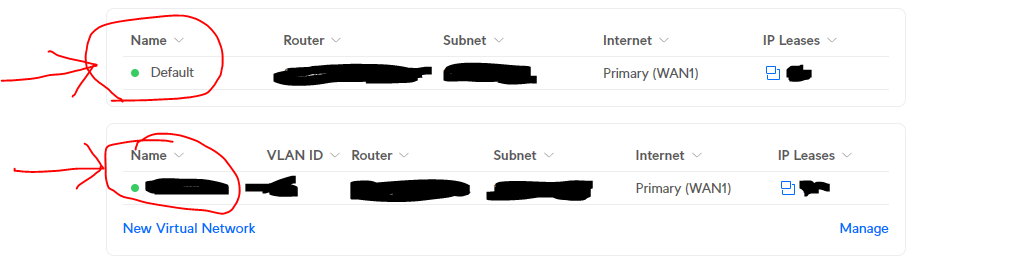
If we forget that step the unifi will complaint about the IP being used in the Default network.
After we pause all Site-to-Site VPN.
If we forget that step the unifi will complain that it can't change the gateway.
After all those steps, now we can change the public IP :)