Lorky`s Blog - Techno ressources and general informations for everyone !
Note
All blog links are archived here.
How to automount a USB device class in Windows Server Virtual Machine from a ESX
December 1, 2019, 9:52 pmHi everyone!
Today I will share a tip if you need to automount some USB device inside your Windows VM.
The goal can be to auto mount some necessary devices, in my case it was to aumount USB HDD used for the backup chain.
The first step is to mount it to the VM with the ESX's control.
When it's mounted, you will be able to naviguate there to find the corrcet ID;
HKLM\Machine\CurrentControlSet\Enum\USB
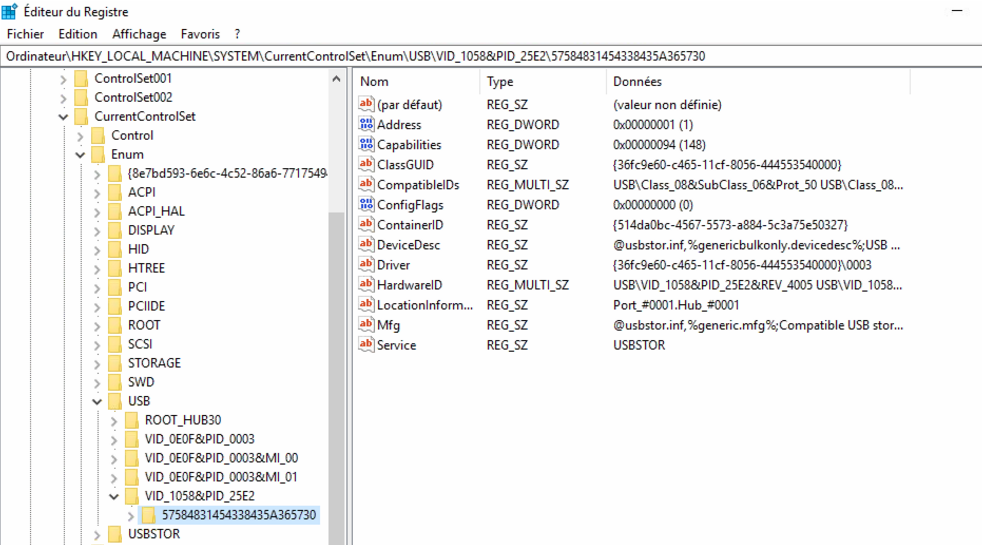
From there we have our USB ID; Check the line HardwareID
We now need to go to our ESX datastore to edit the VM .vmx's file;

In the file VMX, we add that line;

usb.autoconnect.device0 = "0x1058:0x25e2"
As you can see we used our hardwareID to make that entry inside the VMX
Time to test after, unplug and plug the device, and it should reconnect now :)
Windows 2019 RDS | Publishing RADC shortcut on the Desktop
November 25, 2019, 10:54 pmHi everyone
Today I wanted to share a small tip that I found if you publish Work Ressource items to your computers, but you want to publish a icon into the desktop of the user.
By default RADC support only to display the item inside your Start Menu like so;
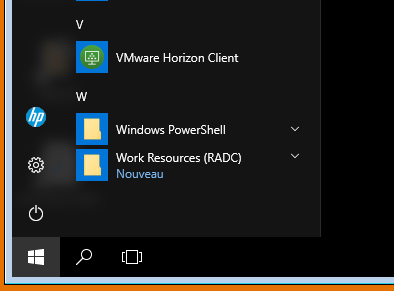
If your customers are used to the Citrix's way to publish to the desktop. I suggest a small folder shortcut to the RADC's ressources.
The path to use is;
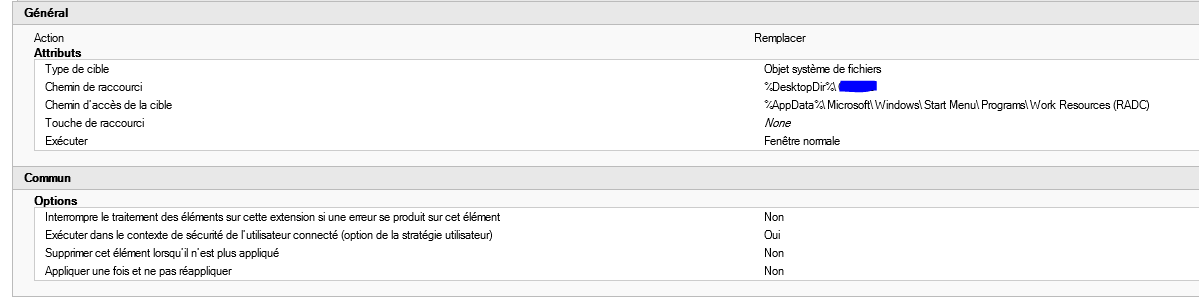
%AppData%\Microsoft\Windows\Start Menu\Programs\Work Ressources (RADC)
With that path you can create a small GPO that create the icon inside the user desktop;
Thanks !
Testing DKIM records with NSLOOKUP
November 21, 2019, 5:31 pmHi everyone
Today I wanted to share a small and handy tip to test any DKIM setup.
I used to generate my DKIM key(s) and my problem were that I do not control the DNS's server which hold my public DKIM's key pair.
As such at first when I was sending a email to a source like hotmail.com, the header was showing me that;
dkim=fail (invalid public key)
As such, now I had to dig the why, and many website offer to check the DKIM, but I was stumbled on how to do it by hand myself.
I found that nslookup was the saviour.. again.. :)
So the tip is to issue;
nslookup
set q=TXT
# There you type your DKIM selector for your domain;
SELECTOR._domainkey.yourdomain.com
So if your selector is DKIM_test and your domain is contoso.com;
The string will look like that;
DKIM_test._domainkey.contoso.com
The result would be the current key stored for the domain for that selector;
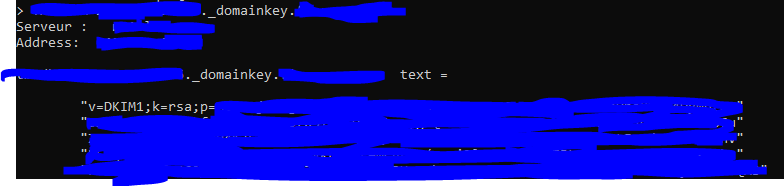
In my case the encryption key was cuted, as some DNS server limit the TXT field to 255 characters, so the field must be split to work good.
Thanks everyone
Windows Server 2019 - WSUS Add Role Error - The request to add or remove features on the specified server failed. the operation cannot be completed because the server that you specified requires a restart
November 4, 2019, 10:41 pmHi everyone.
Today I wanted to share a new bug I stumble into with Windows Server 2019.
The error is showed from the Add Role Wizard;
The request to add or remove features on the specified server failed. the operation cannot be completed because the server that you specified requires a restart
It happened to me while I tried to install the WSUS's role, and no matter how many times I restart, the error always come back.
If such happen the first thing to look for is the WSUS Configuration wizard inside the admin's tool, as the link would be there to finish the configuration even if the error happened in Add/Remove feature.
Click to run the Wizard and click Execute after.
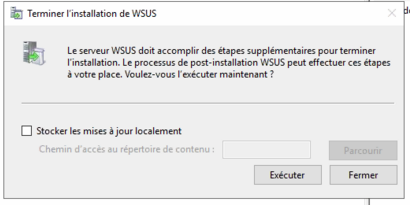
If it's the same error as me, there the wizard will fail, with a link to the error log, please open the log.
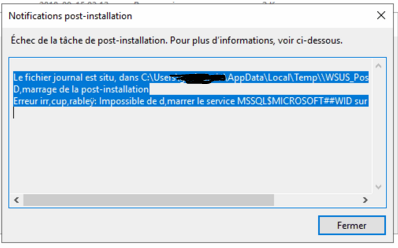
In the log locate the error at the end, there we can see the error; it's a logon error.

In the GPO console, gpedit.msc, please add the Logon as a Service right to the MSSQL account.
NT SERVICE\MSSQL\$MICROSOFT##WID in Computer Configuration—>Policies—>Windows Settings—>Security Settings—>Local Policies—>User Rights Assignment
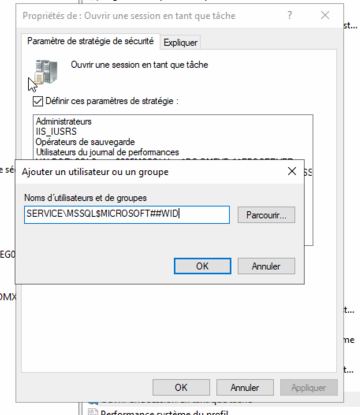
That should do the tip :)
ps, another workaround there
Microsoft Q&A Launch !
October 31, 2019, 7:44 amHi everyone
Good news from Microsoft today, Microsoft Q&A is launched and will soon replace the Technet Forum. The direct link is there.

Good new users would be able to link to their old Technet profile in Q1 of 2020 :)
For over 10 years the MSDN and TechNet Forums played a key part in enabling our customers to unblock their business scenarios by offering a platform where technical questions could be answered by Microsoft and the community . As time progressed, and technology evolved, the needs of the community grew beyond what the existing solution could provide. We started on a journey to identify a new, robust solution which would support our need to evolve the user experience.
We’re excited to share an important milestone in the journey, introducing the preview release of Microsoft Q&A - the place to get answers to all your technical questions on Microsoft products and services.
Just wanted to share it as it's a good news, as the old forum was starting to show it's ages.
Thanks everyone, and happy hunt in the news forum :)