Lorky`s Blog - Techno ressources and general informations for everyone !
Note
All blog links are archived here.
Windows VDA + Roaming Profile + OTP program
October 19, 2016, 6:07 pmHi everyone!
You use roaming profile, a VDA’s system with machine hosted in a cloud and you use a mobile OTP’s program like CA ArcoID OTP inside the desktop? Does it bug and keep locking your key for your users, what to do !!?
Well, look no further, I have the solution.
The problem is actually the OTP program that add a master key locally and in the user profile when you add the device. The problem arise when the user log into another computer, the roaming profile bring back the device configuration from the HCU registry's hive but the masterkey.dat locally is not the same. If one of those key change, the system will generate random number like usual without any warning, but they will not work. (As the key differ).
- First be sure all users got a home folder.
- Now we start, install the OTP’s app in the golden image. (https://support.ca.com/cadocs/0/CA%20RiskMinder%203%201-ENU/Bookshelf_Files/PDF/OTPClient_INSTALL_ENU.pdf)
- Navigate there; c:\Users\Public\CA.
- Copy the ArcotLow’s folder content. It should contain an empty keys.dat and masterkey.dat.
- Copy those file on the user share
- Rename the ArcotLow's folder.
- After open a command prompt in c:\Users\Public\CA
- Run mklink /d ArcotLow x:\ (where x:\ is the home folder)
- Close the golden image, it’s now finish !
Now you can enjoy the OTP’s program that will list the same number than the OTP’s program on your phone in example :)
Thanks
Philippe
Windows VDA – KMS problem - Resetting rearm count
October 19, 2016, 4:12 pmHi everyone !
Today I will talk about a problem I seen often if you manage a big streamed virtual desktop's group. The loss of the KMS's activation, not due to a Windows's problem, but a problem with the streaming software that does not generate unique KMS's key.
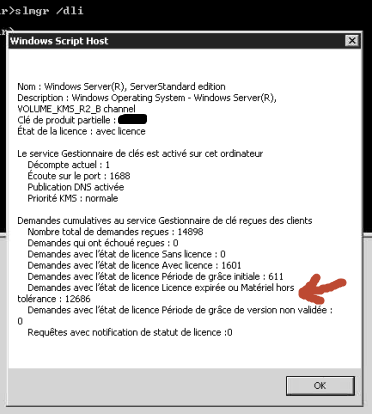
An example of bad health on the KMS's host; ...
Open the Provisioning Services Console

Mount a vdisk in maintenance's mode

Use regedit, click HKLM->Load Hive, and open in the new attached partition the SYSTEM's file.

Give it a temporary name

Naviguate to HKLM\WPA, and erase that folder completely.

Now unmounts the vdisk.

After load the virtual machine up.
Issue that command; slmgr /rearm, and close the VM.
Now watch your KMs's host event log, unique ID should be displayed :)
Now it's finished :)
Thanks !
Philippe
GNU Multiple Precision Arithmetic Library 6.1.1 for Visual Studio 2015
September 8, 2016, 2:24 amA small tip outside my expertise, enjoy.
For building GMP (GNU Multiple Precision Arithmetic Library, http://gmplib.org) under Windows you can follow theses easy step;
- Get latest GMP [source][1].
- Create a folder to store your GMP's library (example C:\gmp)
- Get [MinGW][2].
- Do a full install of MinGW. (+-400m)
- Run msys.bat from C:\MinGW\msys\1.0 if you installed in the default directory.
- Run ./configure --prefix=/c/GMP --build=x86_64-w64-mingw32 --host=x86_64-w64-mingw32 -disable-static --enable-shared. Please note there I didn't used --enable-cxx as the c++ module does not seem to compile well with the new GMP's library. (It reference inttypes.h that mingw can't find)
- Run make
- Run make install
-Run dumpbin /exports libgmp-10.dll >libgmp-10.exports
-Edit the file libgmp-10.exports to leave there only the function name.
-Run lib /def:libgmp-10.def /out:libgmp-10.lib
and voila, you are done.
You will have a .h and a .lib library that you can link to Visual Studio like a .lib.
[1]: http://gmplib.org
[2]: http://sourceforge.net/projects/ming
Office 2016 Error: We re sorry but this feature appears to be broken and needs to be repaired. Use the Programs and Features option in the Windows Control Panel to repair Microsoft Office.
June 21, 2016, 3:46 pmHi everyone. I'am writing this KB's up, as I didnt seen it yet on Microsoft. So if you land there for that error, enjoy the workaround. (This bug appeared to me on a Microsoft Windows Server 2012 R2 with Terminal Service activated)\
Introduction
You install Office 2016 on a computer and only Word 2016 give you an error when you try to open it.
As a local admin you don't see the error.
Symptom
You receive the error : "We're sorry but this feature appears to be broken and needs to be repaired. Use the Programs and Features option in the Windows Control Panel to repair Microsoft Office." when you try to open Word 2016.
Other Office 2016's product are not affected.
Resolution
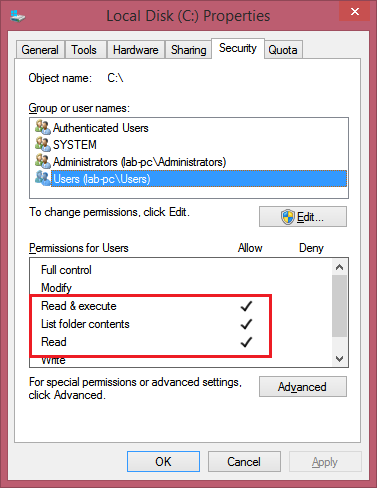
Word 2016 do a file check on the C:\, if the user launching Word 2016 does not have Read Access to the C:\ Word 2016 give the error.
This happen if the default right got changed. The setting must be like that:
Related KB
Internet Explorer: Make it work with old certificate
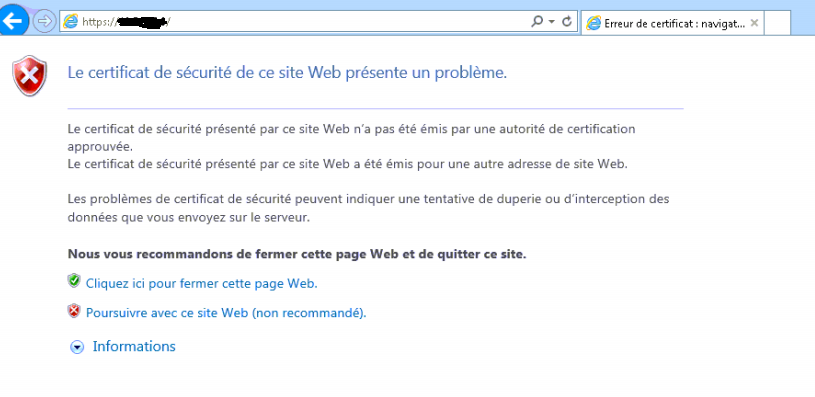
June 21, 2015, 2:21 pmDo you happen to have a old appliance that you can't change the certificate in it, and now it does not what to work in Internet Explorer ? then the tip is for you.
Symptom : You can't process to the website as the certificate is tagged invalid.
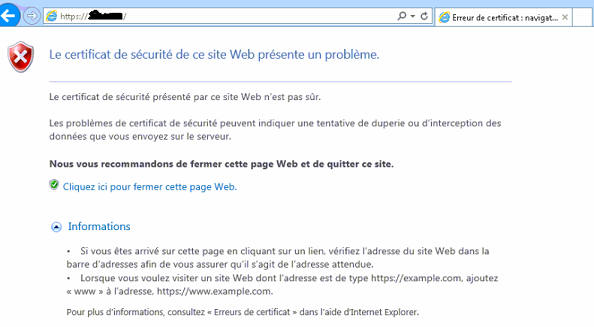
Correction
Open a command prompt
Enter that command: certutil -setreg chain\minRSAPubKeyBitLenght 512
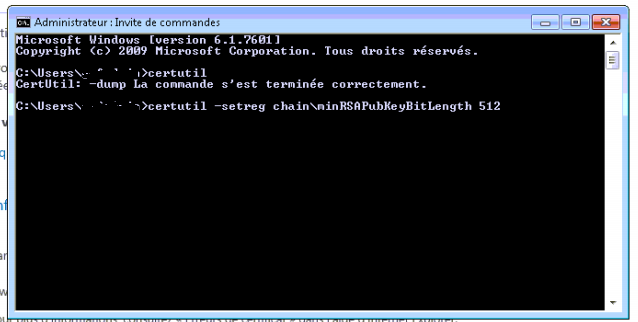
Now; atleast you can hit to continue to the website.