Lorky`s Blog - Techno ressources and general informations for everyone !
Note
All blog links are archived here.
Godaddy certificate
November 11, 2026, 6:01 pmHi everyone
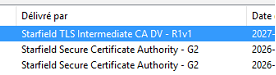
I wanted to state a strange problem I had, the web site was OK with all browser except Chrome.. I invistiguated a bit and I find that the cause is the certificate chain is broke, as Godaddy changed their root structure in October 2026.
As see there;
If it happen to you, you can check the error with the openssl client;
openssl.exe s_client -connect domain:443
The result will probably show something like that;
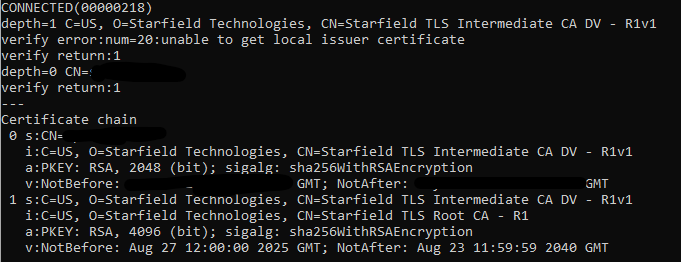
The error is because the root certificate is not ok for Chrome, so as a workaround we can instal other intermidiate certificate to make the chain work.
So, we will go from;
[Leaf Certificate] > [GoDaddy TLS Intermediate CA DV - R1v1] > [GoDaddy TLS Root CA - R1]
[Leaf Certificate] > [Starfield TLS Intermediate CA DV - R1v1] > [Starfield TLS Root CA - R1]
To something more like;
[Leaf Certificate] > [GoDaddy TLS Intermediate CA DV - R1v1] > [GoDaddy TLS Root CA - R1 to G2 Cross Certificate] > [GoDaddy Root CA - G2]
[Leaf Certificate] > [Starfield TLS Intermediate CA DV - R1v1] > [Starfield TLS Root CA - R1 to G2 Cross Certificate] > [Starfield Root CA - G2]
First thing is to download those certificate to install them in certmgr mmc. In local machine mode, and imported into Intermidiate Certificate Autority.
Go there; https://certs.godaddy.com/repository
In my case it was;
- Starfield TLS Intermediate CA DV - R1v1 (https://certs.godaddy.com/repository/sf_tls_issuing_dv-r1v1.crt)
- Starfield PKCS7 Certificate Intermediates Bundle (for Windows IIS) - DV - R1 with Cross to G2, includes Root (https://certs.godaddy.com/repository/sf_dv-r1-g2_iis_intermediates.p7b)
After it's installed, remove the Starfield TLS Root CA - R1 that is signed by itself.
In the final it should be like that;


In IIS the strange part is iisreset dont reset the binding/cache, so I had in case to select another certificate to re-click the certificate to have IIS serve the correct chain'ed certificate.
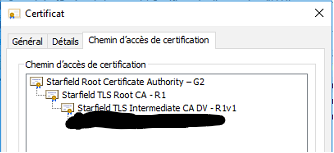
In the final a certificate "show" display it like that;
Some article that talk the issue;
- https://techsearch.watchguard.com/KB?type=Article&SFDCID=kA1Vr000000JCNFKA4&lang=en_US
- https://community.fortinet.com/fortigate-3/technical-tip-resolving-certificate-warnings-for-dv-tls-certificates-issued-by-godaddy-starfield-s-r1-root-hierarchy-228937?tid=228937&fid=3
Exchange Online Send AS Keep Sent Item in Shared Mailbox
June 17, 2024, 12:58 pm
Hi everyone
If in a shared mailbox you need to keep the sent items in the mailbox and not just in the main account that sent the mail item, you have to make a small change via powershell. You can do the chnage in the local Outlook too, but I suggest in powershell as it will follow anyone that send from that mailbox.
There is the step;
Install-Module ExchangeOnlineManagement
Connect-ExchangeOnline -UserPrincipalName admin@account.onmicrosoft.com
Get-Mailbox
Set-Mailbox <mailbox name> -MessageCopyForSentAsEnabled $True
Set-Mailbox <mailbox name> -MessageCopyForSendOnBehalfEnabled $True
After the command we can validate the mailbox to be sure it's set, or not;
Get-Mailbox <mailbox-name> | fl
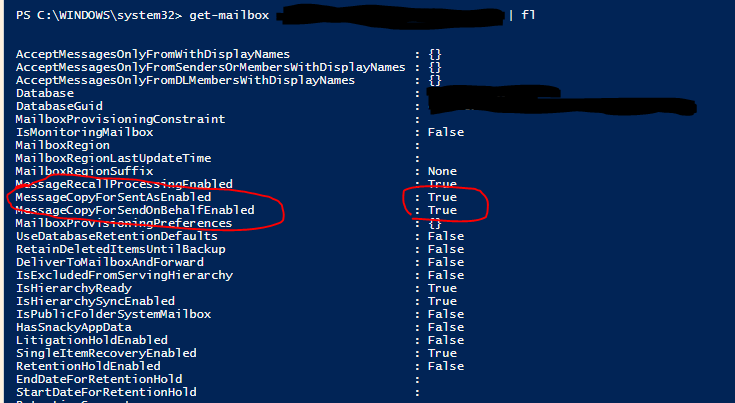
That should do the tip to have the sent items saved inside the shared mailbox sent item's folder !
Windows Server 2025 In Preview !
May 31, 2024, 12:34 pm
Hi everyone !
I wanted to share that today Windows Server 2025 was available to test in preview !
To quote the article for the main change;
Some key improvements include:
- **Hybrid**: Adapt quickly across hybrid, cloud and edge. Easier to connect to Azure Arc to bridge on-premises and cloud-based servers. Deliver Azure capabilities to your on-premises servers.
- **Security**: Hardware and software-level security to deter cyberattacks; next-generation Active Directory that improves security and scalability. Enable a tailored security baseline and configure drift protection from the start.
- **Modern, future-ready platform**: Windows Server 2025 is now easier to upgrade and scale, with better-than-ever app compatibility. Windows Server 2025 desktop brings consistent client and server UI experience, plus conveniences like WiFi and Bluetooth.
- **Performance**: Faster and easier networking and storage; live hotpatching for reduced downtime; GPU partitioning for inferencing at the edge. Improvements in flash-based storage make Windows Server an even better platform for SQL Server.
Ref: Gain enhanced security and performance with Windows Server 2025—now in preview
Exchange Server SE - The beginning of a new Era !
May 7, 2024, 12:40 pm
Today we got some exciting news about the new Exchange features that is coming ! Finally the Exchange 2019 successor got named as Exchange Server Subscription Edition (SE).
The releasing will be in late 2025 (Q3), with a possible CU1 in Q4 of 2025.
Exchange Server 2019 will got a final CU, the CU15, that will prepare the 2019 to be Exchange Server SE.
If you are already at the latest Exchange CU, the update is like only to install a CU.

As the CU prepare the server to be ready for Exchange Server SE, some major change will happen in that CU15, as;
- Adding support for TLS1.3
- Adding back the long awaited certificate management in the EAC.
For the other minor changes and all the details, there is the link to the full article !
Exchange Server Roadmap Update
Be ready by be up to date ! and to be secure too at the same time :)
WSUS Windows Update error 0x80244022
January 15, 2024, 1:41 pm
Hi everyone !
Todya I wanted to share a bug you can encounter on your computer and Windows Server Update Service's server.
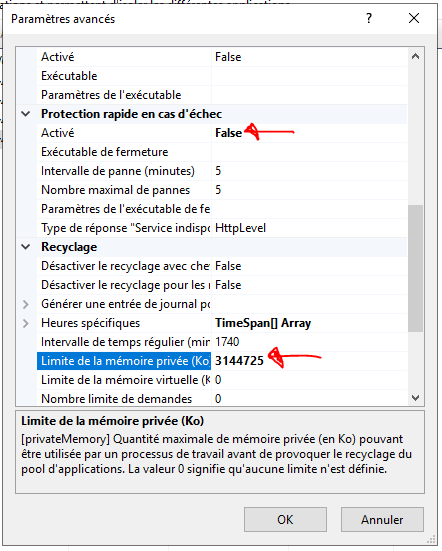
This is the event id 0x80244022, and the reason is a faulting App in the IIS AppPool. You can enlarge the memory to have it work better.
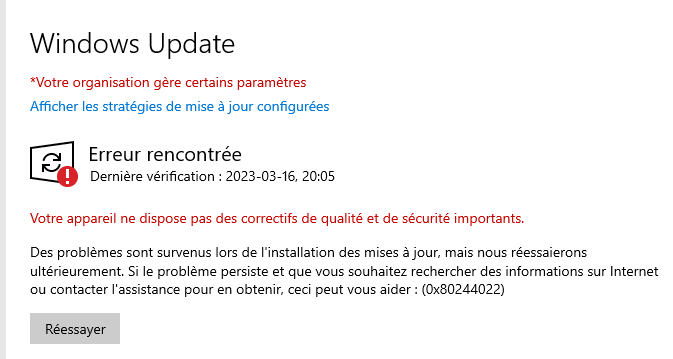
I set 3G, but at 0 it's unlimited .
There the step to do it;
Open IIS Manager
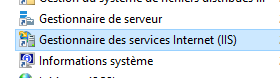
Click to show the App pools;
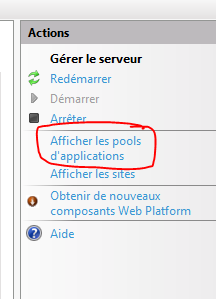
Click on WsusPool, stop it if not stopped.

Right click in Advanced detail, and look for those settings to change;