Lorky`s Blog - Techno ressources and general informations for everyone !
Note
All blog links are archived here.
List Installed Update WMI
December 6, 2022, 3:58 pm
Hi everyone
Today I wanted to share a small but handy tip to list all updates.
It come handy when you want to compare all updates on some machines for problems.
wmic qfe get hotfixid,installedon
The output look like that;
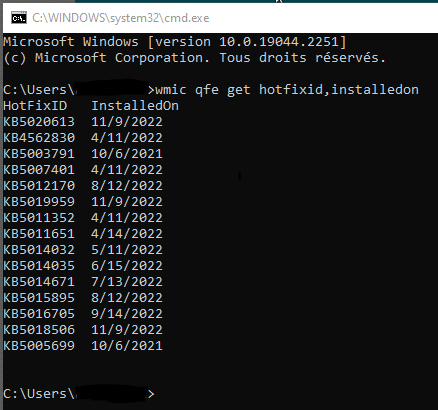
As you can see it's easy after to compare server, or to know which update got installed when.
Remove Teams Auto Signin with Domain Account
December 2, 2022, 3:51 pm
Hi everyone !
Today I wanted to share a small tip if you want to disable team from using the domain upn when the session open for the first time.
The tip is nice as when the user open Team for the first time if you are hybrid / on-prem the users can have difficulty to open team as they need to select "use another email" in the windows footer. If the user don't use the correct login then a loop happen, the sign-off seem impossible from Teams when it try to load an unexisting account. (Removing team and reisntalling it is the easiest workaround if it happen)
The tip can be easilly done by Group Policy.
The magic registry key to use in our case is SkipUpnPrefill (HCU\Software\Microsoft\Office\Teams)

You can create the settings are in GPP;
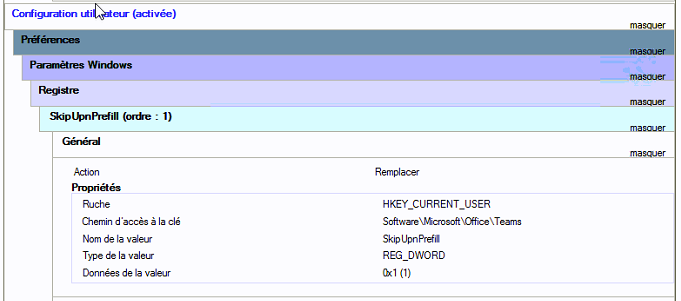
As you can see it's a easy tip to do :) (more read on the settings here; https://learn.microsoft.com/en-us/microsoftteams/troubleshoot/authentication/teams-defaults-to-domain-joined-account)
Thanks everyone
Windows Server 2019 - Clean WSUS WID Database
November 22, 2022, 8:28 pm
Hi everyone
Today I wanted to share a tip to clean up your WSUS WID database.
The tip allow you to not remove and reinstall to achieve the same goal. You save 2 reboot in the least.
The first step is to close the services;
Stop-Service WSUSService, W3SVC
Make sure the service is stopped;
Get-Service WSUSService, W3SVC
Erase the database file;
C:\windows\WID\Data\susdb.*
After that we need to connect to the database service, as for it the data is still there yet;
We need to restart the service;
Start-Service WSUSService, W3SVC
Use HeidiSQL portable edition, (https://www.heidisql.com/download.php)
Use named pipe and that to connect;
\.\pipe\MICROSOFT##WID\tsql\query
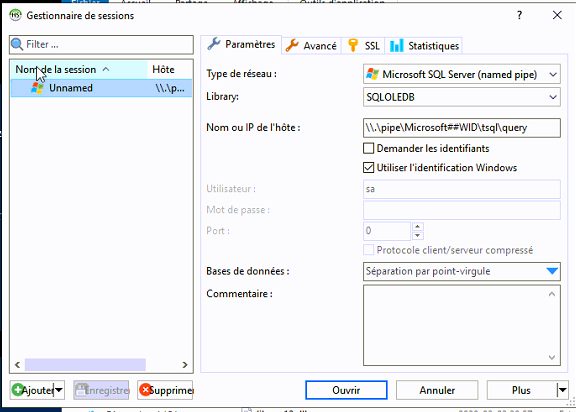
The connection might give you such error; just click OK and ignore it

From there use that command to reset the database;
Click to Run
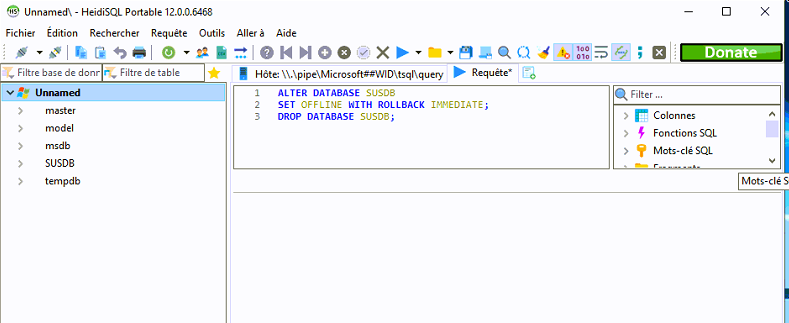
Now technically speaking the WSUS is empty, but the console will fail to open at that point. We need to redo the WSUS wizard, which can be run that way;
Program Files\Update Services\Tools\Wsusutil.exe postinstall CONTENT_DIR="e:\WSUS"
Make sure the folder you write in CONTENT_DIR is empty.

After the command, the WSUS's console should open correctly, and it should ask you about what product and language you want :)
Force GPUpdate for all computers
November 21, 2022, 10:28 pm
Hi everyone !
Today I wanted to talk about a small tip if you need to refresh a computer gpo for some computer OU.
I will talk the powershell command let; Invoke-GPUpdate
The commad let is powerfull, as you can target a computer, and to update only user settings; that way;
Invoke-GPUpdate -Computer "DOMAIN\WORKSTATION-001" -Target "User"
The last command let I wanted to talk is a more complex's one, like this one;
Get-ADComputer –filter * -Searchbase "ou=Site-A, dc=Domain,dc=com" | foreach{ Invoke-GPUpdate –computer \$_.name -force}
That one will search a complete OU for all computer account, and invoke a gpupdate /force on them.
Before running it I suggest to try the Get-ADComputer command let to be sure it target computer you want;
Get-ADComputer –filter * -Searchbase "ou=Site-A, dc=Domain,dc=com" | fl
Make sure you know that the remote user will see a gpupdate's windows, to have it hidden make sure you use -AsJob in your command let.
Thansk everyone for listening
Domain join hardening changes
November 10, 2022, 1:55 pm
Hi everyone
Today I wanted to talk a change that Microsoft did for domain join.
After the 11 October 2022 the KB5020276 introduce some concept change that will help a lot to make domain join error free.
I will quote the legacy behavior;
Before you install the October 11, 2022, or later cumulative updates, the client computer queries Active Directory for an existing account with the same name. This query occurs during domain join and computer account provisioning. If such an account exists, the client will automatically attempt to reuse it.
Note The reuse attempt will fail if the user who attempts the domain join operation does not have the appropriate write permissions. However, if the user has enough permissions the domain join will succeed.
There are two scenarios for domain join with respective default behaviors and flags as follows:
Domain Join (NetJoinDomain)
Defaults to account reuse (unless NETSETUP_NO_ACCT_REUSE flag is specified)
Account provisioning (NetProvisionComputerAccountNetCreateProvisioningPackage).
Defaults to NO reuse (unless NETSETUP_PROVISION_REUSE_ACCOUNT is specified.)
After the change there is an addional security check that is done.
- Account reuse will be permitted if done by the account creator.
- Account reuse will be permitted if done by a member of the domain admin's group.
That way if you have delegated the domain join task it enforce more security for account name.
Following that change you can see that error message; which would be normal if the two conditions are not met.
Error 0xaac (2732): NERR_AccountReuseBlockedByPolicy: “An account with the same name exists in Active Directory. Re-using the account was blocked by security policy.”
Some more information on additional's step that can be done;
Take Action
Review computer account provisioning workflows and understand if changes are required.Perform the join operation using the same account that created the computer account in the target domain.
If the existing account is stale (unused), delete it before attempting to join the domain again.
Rename the computer and join using a different account that doesn’t already exist.
If the existing account is owned by a trusted security principal and an administrator wants to reuse the account, they might do so by temporarily setting the following registry key at the individual client computer level. Then immediately remove the registry setting after the join operation is complete. No restart is necessary for changes to the registry key to take effect.
Path
HKLM\System\CurrentControlSet\Control\LSA
Type
REG_DWORD
Name
NetJoinLegacyAccountReuse
Value
1
Other values are ignored.
Important guidance for using option 4
Caution: If you choose to set this key to work around these protections, you will leave your environment vulnerable to CVE-2022-38042 unless your scenario is referenced below as appropriate. Do not use this method without confirmation that the Creator/Owner of the existing computer object is a secure and trusted security principal.It is appropriate to use solution 4 in the following scenarios:
An IT admin with delegated permissions needs to rejoin a computer to the target domain for troubleshooting purposes and the original account creator is a trusted account.
OR
A deployment scenario in which computer accounts are created before using a dedicated service account (such as SCCM or other software) and the domain join is performed by a second dedicated account with delegated domain-join permissions (for example, "This account is allowed to join this computer to the domain").
Microsoft might remove support for the NetJoinLegacyAccountReuse registry setting in a future update and replace it with an alternative method. This article will be updated if and when such changes take place.
Nonsolutions
Do not add service accounts or provisioning accounts to the Domain Admins security group.Do not manually edit the security descriptor on computer accounts in an attempt to redefine the ownership of such accounts. While editing the owner will enable the new checks to succeed, the computer account might retain the same potentially risky, unwanted permissions for the original owner unless explicitly reviewed and removed.
Do not add the NetJoinLegacyAccountReuse registry key to base OS images because the key should only be temporarily added and then removed directly after the domain join completes.
The article in reference is; KB5020276—Netjoin: Domain join hardening changes